Introduction
In this post, we will explore how I was able to get gpui.rs running on fedora 44.
To speak about gpui.rs, it is a cross-platform GUI framework written in Rust by Zed, an over-engineered native GPU accelerated IDE which I use to squeeze out performance from my device. As Zed is built on top of gpui, I am curious about gpui state for building my own GUI applications.
So, I decided to give gpui.rs a try on fedora 44.
Setup
- Install Rust
- Create a folder for your project:
mkdir gpui-demo - Navigate to the folder:
cd gpui-demo - Initialize a new Rust project:
cargo init . - Add gpui as a dependency:
cargo add gpui
main.rs
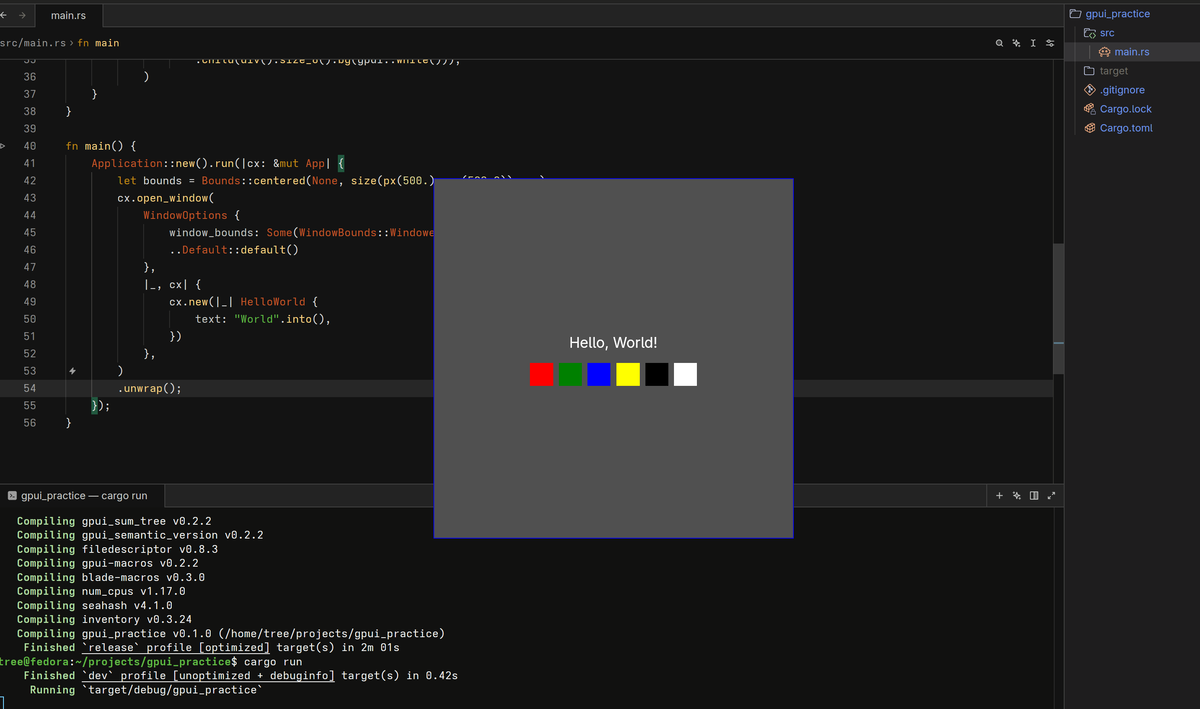
As I am learning to use gpui, I started with Hello, World! code provided by the gpui team at gpui.rs.
use gpui::{
    div, prelude::*, px, rgb, size, App, Application, Bounds, Context, SharedString, Window,
    WindowBounds, WindowOptions,
};

struct HelloWorld {
    text: SharedString,
}

impl Render for HelloWorld {
    fn render(&mut self, _window: &mut Window, _cx: &mut Context<Self>) -> impl IntoElement {
        div()
            .flex()
            .flex_col()
            .gap_3()
            .bg(rgb(0x505050))
            .size(px(500.0))
            .justify_center()
            .items_center()
            .shadow_lg()
            .border_1()
            .border_color(rgb(0x0000ff))
            .text_xl()
            .text_color(rgb(0xffffff))
            .child(format!("Hello, {}!", &self.text))
            .child(
                div()
                    .flex()
                    .gap_2()
                    .child(div().size_8().bg(gpui::red()))
                    .child(div().size_8().bg(gpui::green()))
                    .child(div().size_8().bg(gpui::blue()))
                    .child(div().size_8().bg(gpui::yellow()))
                    .child(div().size_8().bg(gpui::black()))
                    .child(div().size_8().bg(gpui::white())),
            )
    }
}

fn main() {
    Application::new().run(|cx: &mut App| {
        let bounds = Bounds::centered(None, size(px(500.), px(500.0)), cx);
        cx.open_window(
            WindowOptions {
                window_bounds: Some(WindowBounds::Windowed(bounds)),
                ..Default::default()
            },
            |_, cx| {
                cx.new(|_| HelloWorld {
                    text: "World".into(),
                })
            },
        )
        .unwrap();
    });
}
Install Build Essentials
Before we can build gpui, we need to install some build essentials:
sudo dnf install gcc gcc-c++ make binutils clang pkg-configInstall GPUI System Dependencies
sudo dnf install \
    libxkbcommon-devel \
    libxkbcommon-x11-devel \
    wayland-devel \
    mesa-libGL-devel \
    libX11-devel \
    libxcb-devel \
    libXcursor-devel \
    libXi-devel \
    libXinerama-devel \
    libXrandr-devel \
    fontconfig-devel \
    vulkan-loader-devel \
    vulkan-headers \
    openssl-devel \
    dbus-devel \
    systemd-devel \
    perl-FindBin perl-File-Compare perl-File-Copy
If you are still having issues like, you can try:
cargo build 2>&1 | grep "ld: "and check for missing libraries.
= note: rust-lld: error: unable to find library -lxkbcommon-x11You can install the missing library using dnf.
sudo dnf install libxkbcommon-x11-develYou can try checking for gcc or clang for linker.
For example,
CC=clang cargo runelse, regular cargo run.
It will compile (takes some time), and then run the compiled binary automatically.
If you want to build without running, use cargo build(for debugging), cargo build --release(for release), and then run the compiled binary manually.
Output
Congratulations! Your gpui build is complete and ready to use.